


리디 - 웹툰, 만화, 웹소설, 전자책 모두 여기에!
4.3233.00 Reviews
App Specs
- Version
- 26.7.3
- Updated On
- License
- Free
- Downloads
- 5,000,000+
- Developer
- RIDI Corporation
- Categories
- Comics
- Platform
- Android, iOS
Screenshots


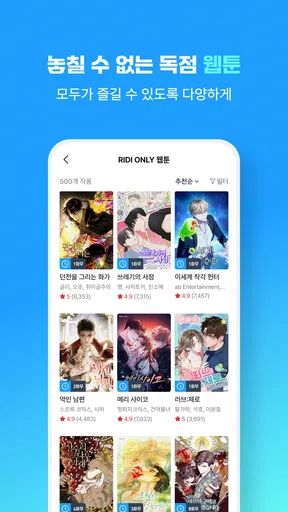




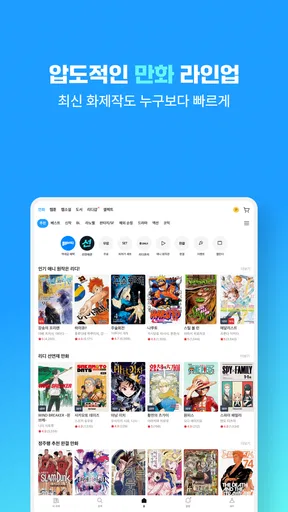
 Analysis by AppCompare
I tend to judge a reading app by what happens after the first few minutes: can I find something that suits my mood, resume it later, and avoid turning a quick browse into a confusing pile of purchases? RIDI is built for readers who move between illustrated stories and text, bringing comics, web novels, and e-books into one app. That breadth is its main appeal, but it also means it helps to approach it with a little intention rather than expecting every kind of reading to work the same way.
Where browsing can get confusing
The first friction point is choice. A large catalogue can be exciting, but when you are switching between webtoons, comics, serialized fiction, and longer e-books, browsing can feel less like opening a single bookshop and more like walking into several departments at once. I would start with the format I actually want to read today, then narrow down by subject or author instead of scrolling without a plan. That simple habit makes discovery feel more manageable.
It is also worth separating “interesting to sample” from “something I want to keep reading.” A vivid cover or a popular title can draw me in, but a short preview or opening section is a better test of the writing, artwork, pacing, and translation style. For serial stories, I pay attention to whether the episode ends at a satisfying point for me; for an e-book, I give the opening a little more time. The best choice is not always the most visible one.
Before committing to a long reading session, I would check how a title is offered in the app and what the next step will cost. RIDI is free to install, but it includes in-app purchases, with individual items priced from $0.99 to $189.99. That broad range makes it sensible to pause at checkout and look at the specific item rather than assume that every story follows the same payment pattern. If you are trying to control spending, decide on a personal limit before browsing and treat each purchase as a separate choice.
Setup checks that prevent avoidable hassle
RIDI comes from RIDI Corporation and has been around since September 20, 2010. Its current version is 26.1.1, and it requires Android 9 or later. I would check the operating-system requirement before installing, especially on an older device; a download problem caused by an incompatible system is different from an app that installs but misbehaves.
On first use, I find it helpful to confirm that I am signed into the account I intend to use before building a reading routine around it. If you read across more than one device, keeping the same account in use is a sensible first check when your place in a story does not appear where you expect. I would also open a title while connected to a reliable network before a commute or trip, rather than waiting until I need it.
One small but useful distinction: being able to browse a title does not necessarily mean that every part of it is already available for offline reading. I would open the specific book or episode and check what the app makes available before relying on it away from a connection. The same goes for storage: if a device is nearly full, clearing space before preparing a reading session can prevent a last-minute scramble.
Worth Reading Before You Choose

Baby Panda World Brings Quick Play to Modern Phones, but Its Game Library Feels Busy

ESPN’s Live Game View Makes Following Close Games Easier

QuizzLand Review: A Good Fit for Short Trivia Breaks, Not Every Player

Basketball Stars: Multiplayer Is Fast, but Can It Recover When Matches Go Wrong?

WEBTOON Turns Phone Updates Into a Better Reading Routine

Link to Windows Runs on Shared Habits, Not Social Feeds
A calmer workflow when something goes wrong
If a page will not load, I would first check whether the connection is working in another app, then return to RIDI and try again. If only one title is affected, back out to its listing and reopen it; if the whole app seems stuck, closing and reopening it is a low-risk next step. These checks are basic, but they help distinguish a temporary loading hiccup from a broader device or network issue.
When your reading position seems wrong, avoid immediately opening several episodes or chapters in quick succession. First return to the title you were reading and inspect the last section you remember. For a story you are following over time, bookmarking the current point before switching formats or titles gives you a practical reference if progress does not look right later. I treat bookmarks as a deliberate backup, not just a decoration.
For purchase questions, slow down before repeating a checkout attempt. Review the item and the transaction status in the app, and use the relevant account or store support route if the result is unclear. Repeating a payment action because a screen appears delayed can create more confusion than it solves. This is one place where patience is more useful than tapping faster.
When the app may not be the cause
Reading problems do not always begin inside the reader. A weak connection can interrupt browsing or loading, a device with little free space can make preparation for offline use awkward, and an older operating system can prevent installation. Checking those basics first saves time and avoids treating every inconvenience as an app defect.
Content choice is another separate issue. RIDI is rated Teen, but that does not mean every title will suit every reader in that age group or every household. I would look at the individual work and decide whether its themes and tone are appropriate, especially when choosing something for a younger reader. The overall age label is a starting point, not a substitute for judging a particular story.
Discover a Universe of Content
Imagine having a library that fits right in your pocket. That's what RIDI offers. This app is like the ultimate treasure trove for those of us who can't get enough of reading diverse genres and styles. From the moment I opened it, I was greeted with a sleek interface that screams "read me!"
The app's layout is intuitive, making it super easy to navigate. Whether you're a die-hard comic fan or a casual novel reader, finding your next read is a breeze. The search function is particularly robust, allowing you to filter by genre, author, and even popularity. It's like having your personal librarian at your fingertips.
Webtoons and Comics Galore!
One of the standout features of this app is its extensive collection of webtoons and comics. If you're like me and enjoy vibrant illustrations and engaging stories, you'll feel right at home. The variety is impressive, ranging from action-packed adventures to heartwarming slice-of-life tales.
Each comic is beautifully rendered, and the app supports both horizontal and vertical reading modes, which is a huge plus. I found myself getting lost in the vivid worlds and intricate plots, often losing track of time. It's like having an entire comic convention right on your phone.
Unleash Your Imagination with Web Novels
But wait, there's more! The app isn't just about comics. It's also a haven for web novel enthusiasts. With stories spanning every imaginable genre, there's never a dull moment. Whether you're into fantasy, mystery, or romance, there's something for everyone.
The web novels are well-organized, and I love that you can easily bookmark your spot. Plus, the app keeps track of your progress, so you never lose your place. It's a small feature, but it makes a world of difference when you're juggling multiple stories.
Dive into E-Books
If you're an e-book aficionado, this app's got you covered too. The selection of e-books is vast, including both popular titles and hidden gems. Whether you're looking for the latest bestseller or a classic novel, you'll find it here.
I was particularly impressed by the reading settings. You can adjust the font size, background color, and even the brightness to suit your preferences. It's all about making your reading experience as comfortable as possible. Plus, the offline reading mode is a lifesaver for those long commutes or flights.
Choosing the right reading routine
The app makes the most sense if you enjoy more than one format. I might read a webtoon in short bursts while waiting for an appointment, then switch to a novel when I have a quieter stretch. That flexibility is a real advantage over a comics-only reader or a conventional e-book app, where changing formats often means changing services. The trade-off is that a broad catalogue can make it harder to keep a focused reading habit unless I use a simple shortlist of titles I genuinely want to continue.
A practical routine is to keep the browsing and reading parts separate. I can explore when I have time, choose a title, and then return directly to it during a brief break instead of reopening the whole catalogue and getting distracted. If I am following several serials, I avoid starting another one just because it appears prominently; otherwise, reading becomes a growing backlog rather than a relaxing break. This is especially helpful for readers who like trying new stories but do not want to lose track of ongoing ones.
For an everyday example, picture a train ride with an unreliable connection. I would choose what I plan to read before leaving, check that the particular material is ready for offline use, and keep a bookmark at the point I want to resume. If the trip gets interrupted, that preparation matters more than having a huge library on screen. For a short ride, a comic episode may fit better; for a longer stretch, an e-book or web novel may be easier to settle into. The app's range lets me make that choice without committing to one reading style.
Who will enjoy it, and who may prefer another app
I would recommend RIDI most readily to someone who already reads Korean digital stories or wants one place to explore comics, web novels, and e-books. Its appeal is strongest when those formats are part of the same routine. The app is also a sensible option for a reader who likes sampling different genres and can take a moment to check the terms for each title before buying.
It is less suitable if you want a strictly free library, dislike in-app spending, or prefer a single-purpose interface with no temptation to browse beyond one format. In those cases, a library service or a dedicated comic or e-book reader may fit better, depending on what you already use and what content is available to you. I would also think twice before recommending it to someone who expects every title to be included simply because the app itself costs nothing to install.
Its overall reception is encouraging: RIDI has a 4.3 average from around 38,000 ratings and has passed 5 million installs. Those figures suggest that it has found a substantial audience, though they do not tell me whether a particular title, payment choice, or reading interface will suit an individual. I would use them as context, not as a substitute for trying the formats and checking the costs that matter to me.
Why You Should Download It
So, why should you download RIDI? Well, if you're a fan of digital literature, this app is a must-have. It combines an enormous library of content with a user-friendly experience, making it easy to indulge in your reading passion.
The app is frequently updated with new releases, ensuring that you're always in the loop with the latest trends. Plus, the community aspect, where you can leave reviews and ratings, adds a social dimension that lets you connect with fellow readers.
In conclusion, this app is a fantastic gateway to a world of stories. Whether you're an avid reader or just looking for something to pass the time, 리디 - 웹툰, 만화, 웹소설, 전자책 모두 여기에! has something to offer. So go ahead, give it a try, and let your imagination soar!
My practical verdict
For me, RIDI is most convincing as a flexible reading destination, not as a promise that every story is free or every reader will want every format. I would install it when I wanted comics and prose in the same place, check the operating-system requirement, and browse with a spending limit in mind. If I mainly wanted a single reading format or needed a completely no-cost catalogue, I would choose a more focused alternative instead.
That balance is why I would recommend giving it a careful try rather than approaching it as an automatic must-have. The app is free to install, but individual purchases can vary widely; a few minutes spent checking a title and its cost can prevent disappointment later. If its mix of illustrated and written stories matches how you like to read, RIDI can make it easy to move from one kind of story to another without changing apps.
Pros
- Extensive library of content.
- User-friendly interface.
- Offline reading available.
- Multiple genres covered.
- Regular updates with new releases.
Cons
- Some content requires purchase.
- Occasional app crashes.
- Limited free content access.
- Ads in the free version.
- Requires stable internet for updates.
FAQs for 리디 - 웹툰, 만화, 웹소설, 전자책 모두 여기에!
What types of content can I find on 리디?
리디 offers a diverse range of digital content, including webtoons, comics, web novels, and e-books. Whether you're into graphic novels, serialized web stories, or traditional books, 리디 provides a comprehensive library catering to various interests and genres, making it a one-stop destination for digital reading enthusiasts.
Is 리디 available in multiple languages?
리디 primarily offers content in Korean, which is ideal for native speakers or those learning the language. However, some titles may have translations or subtitles in other languages. It's essential to check the language availability for specific content if you're not proficient in Korean.
How does the subscription model work on 리디?
리디 offers a flexible subscription model that includes free and premium options. The premium subscription provides access to a broader range of content without ads and often includes exclusive releases. Users can choose between different subscription tiers based on their reading habits and preferences.
Can I download content for offline reading on 리디?
Yes, 리디 allows users to download content for offline reading. This feature is beneficial for those who want to enjoy their favorite webtoons, novels, or books without needing a constant internet connection. Simply download the content while connected, and access it anytime, anywhere.
What devices is 리디 compatible with?
리디 is compatible with both Android and iOS devices, making it accessible to a wide range of users. It also offers a desktop version for those who prefer reading on a larger screen. Ensure your device meets the app's system requirements for the best experience.


